
WhatsApp API session message: request ticket info
This scenario sends a free-text WhatsApp message with sendMessage inside the 24-hour customer service window.
Use case overview
This scenario sends a free-text WhatsApp message with sendMessage inside the 24-hour customer service window. Use it after an inbound webhook event when you already have an open session and must request missing ticket details.
Template example
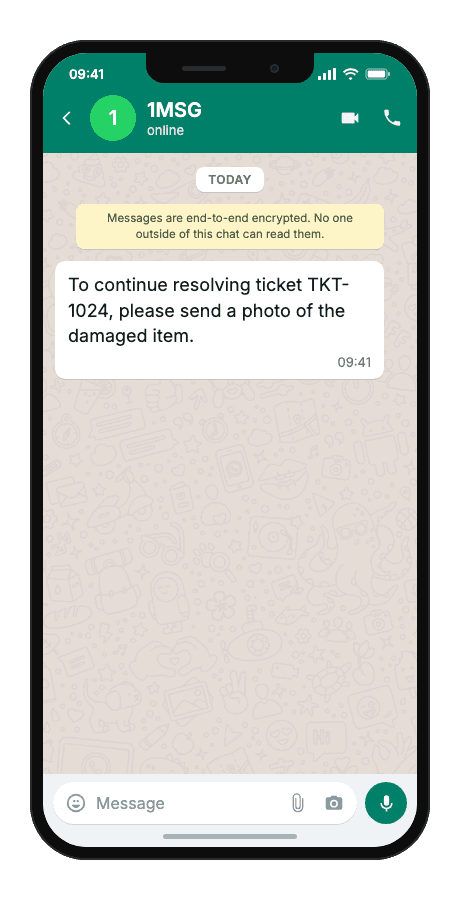
To continue resolving ticket {{1}}, please send {{2}}.
- {{1}}support ticket number
- {{2}}what you need from the client (photo, document, clarification)
When to use it
Reach for this scenario when an inbound webhook shows the client already wrote in WhatsApp and your support team needs one specific photo, document, or clarification before closing the ticket. It fits helpdesk follow-ups where the 24-hour session window is open and a template would add cost and friction to an ongoing dialog.
Workflow
- Status tracked
An inbound client message arrives via webhook.
status:"read" - Capture event
Your backend maps the chat to a ticket and determines the missing detail.
POST/sendMessage - Build & send
A session text message is sent referencing the ticket and the awaited item.
POST/sendMessage - Delivered
The client replies with the requested material in the same session.
delivered
Technical implementation
Prerequisites
- 1MSG API Key · How to get API Key
- WhatsApp Business account · How to Connect WABA
- Open 24-hour session window · How the 24-hour window works
- Customer opt-in · How to Manage Customers Consent
- Webhook endpoint · How to Set Up Webhooks
Code examples
#!/usr/bin/env bash
set -euo pipefail

# === Configuration (replace "___" placeholders) ===
API_BASE_URL="https://api.1msg.io"        # production 1MSG API base URL
CHANNEL_ID="___"                           # channel ID from 1MSG dashboard
API_TOKEN="___"                            # channel JWT token (Bearer)


# === Test data ===
TEST_PHONE="___"                 # client phone in international format · requires open 24-hour session window
TEST_TICKETNUMBER="___"         # {{1}} ticket number
TEST_AWAITEDITEM="___"         # {{2}} awaited item

PHONE_NORM="$(printf '%s' "$TEST_PHONE" | tr -cd '0-9')"

for pair in "CHANNEL_ID=$CHANNEL_ID" "API_TOKEN=$API_TOKEN" "TEST_PHONE=$TEST_PHONE" \
            "TEST_TICKETNUMBER=$TEST_TICKETNUMBER" \
            "TEST_AWAITEDITEM=$TEST_AWAITEDITEM"; do
  val="${pair#*=}"
  if [ -z "$val" ] || [ "$val" = "___" ]; then
    echo "Missing configuration value: ${pair%%=*}" >&2
    exit 1
  fi
done

if [ -z "$PHONE_NORM" ]; then
  echo "Error: phone number has no digits after normalization" >&2
  exit 1
fi

URL="${API_BASE_URL%/}/${CHANNEL_ID}/sendMessage"

read -r -d '' PAYLOAD <<JSON || true
{
  "phone": "${PHONE_NORM}",
  "body": "To continue resolving ticket TKT-1024, please send a photo of the damaged item."
}
JSON

RESPONSE="$(curl -s -w '\n%{http_code}' -X POST "$URL" \
  -H "Content-Type: application/json" \
  -H "Authorization: Bearer ${API_TOKEN}" \
  -d "$PAYLOAD")"

HTTP_CODE="$(printf '%s' "$RESPONSE" | tail -n1)"
BODY="$(printf '%s' "$RESPONSE" | sed '$d')"

case "$BODY" in
  *'"sent":true'*) ok=1 ;;
  *) ok=0 ;;
esac

if [ "$HTTP_CODE" -ge 200 ] && [ "$HTTP_CODE" -lt 300 ] && [ "$ok" -eq 1 ]; then
  echo "Message sent to client."
  echo "API response: $BODY"
else
  echo "Send failed. HTTP status: $HTTP_CODE" >&2
  echo "$BODY" >&2
  exit 1
fi
Response and delivery status
HTTP 2xx and JSON "sent": true mean 1MSG accepted the message for sending — not that it already reached the customer's phone. Save the id field (looks like wamid.…) to correlate delivery callbacks.
{
  "sent": true,
  "message": "Sent to [email protected]",
  "description": "Message has been sent to the provider",
  "id": "wamid.HBgLMzgwNjM5..."
}sentAccepted for sending — not yet on the customer's phone
idStore it; delivery callbacks and
hookInfoare keyed on this
Common errors
| Status | API response | Cause | Fix |
|---|---|---|---|
| 200 | Message was not sent: provide chatId, phone, bsuid, or username | No recipient the channel could resolve. | Pass exactly one recipient: phone (country code plus number, digits only), chatId (for example [email protected]) or bsuid. |
| 200 | Message was not sent: empty body | The body field is missing or empty. | Send a non-empty body string. It is required for text, reply-button and list messages. |
| 401 | token is required | The request has no token. | Add your channel token as the token query parameter: https://api.1msg.io/{channelId}/{method}?token=… |